














Which Apple Watch Do I Have?
Apple Watch models can look very similar from the outside. The easiest way to identify yours is to find its model number, confirm the case size, and match that information with Apple’s current model guide.
Find the Model Number Using Your iPhone.
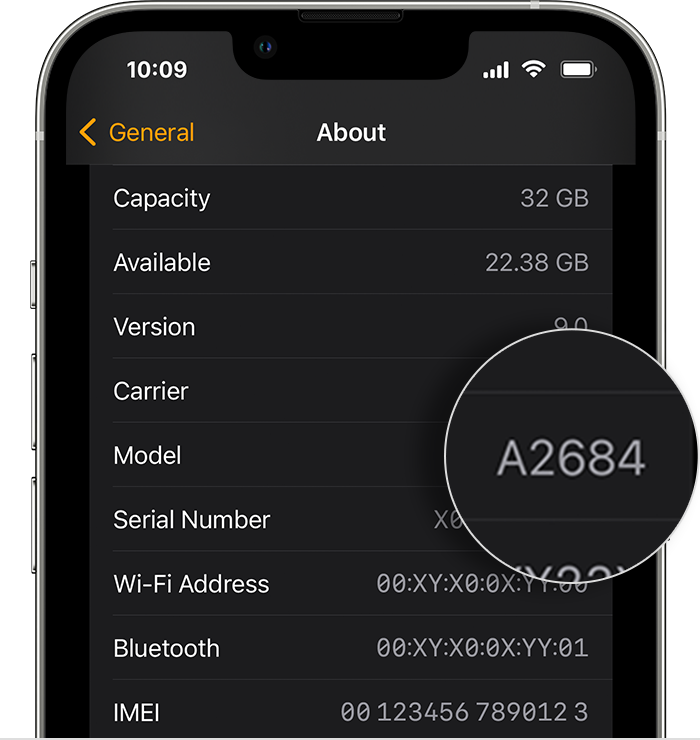
If your Apple Watch is paired with an iPhone, you can find the identifying model number directly inside the Watch app.
On the iPhone paired with your Apple Watch, open the Apple Watch app.
Open the My Watch tab and select General.
Select About to view information about the paired Apple Watch.
The field may initially show a part number beginning with the letter M. Tap it once.
After tapping the field, it should change to a model number beginning with A. Use that number to identify the watch.
M-Number? A-Number? Here’s the Difference.
The Model field can display different identifiers. For identifying the Apple Watch family, the A-number is generally the most useful one.
Part Number
The value initially displayed in the Model field may begin with the letter M. This is the device’s part number.
Model Number
Tap the Model field and it changes to a number beginning with A. This is the model number used to identify your Apple Watch.
Match It With Apple
Apple’s identification guide maps A-numbers to the applicable Apple Watch generation, size and regional configuration.
Check the Back of Your Apple Watch.
The engraving around the back of your Apple Watch can provide additional information that helps narrow down which model you have.
- Apple Watch family or series information
- Case size in millimetres
- Case material
- GPS or Cellular characteristics on applicable models
The exact information engraved on the watch varies by generation, so use it together with the A-number whenever possible.
GPS or GPS + Cellular?
Connectivity is another useful detail when confirming an Apple Watch configuration.
GPS Models
GPS-only and GPS + Cellular versions can have different model numbers even when they belong to the same Apple Watch generation and case size.
Cellular Models
Many Cellular Apple Watch models can also be visually distinguished by a red accent on the Digital Crown, although the exact design varies between generations.
Match Your Number With Apple’s Current Model List.
Apple continues to release new Watch models, so rather than relying on an old static list, use Apple’s current identification guide to match your A-number to the exact model.
Why the Exact Model Matters.
Apple Watch generations can look very similar while using different screens, batteries and internal components. Identifying the correct model helps ensure you select the right fix.
Correct Screen
Screen assemblies can vary between generations and case sizes.
Correct Battery
Battery compatibility depends on the specific Apple Watch model.
Accurate Pricing
Knowing the model helps you find the appropriate service and pricing.
Faster Service
Providing the correct model helps avoid unnecessary compatibility questions before your fix.
Now Let’s Get Your Apple Watch Fixed.
Once you know your Apple Watch model and case size, you can find the appropriate Fix Factory service, view available options and get started.
Fast. Convenient. Reliable.
Certified expert device fixes, on your terms. Here’s what makes us different.
Fixed in
Under 30 Minutes
iPads, Tablets, Board Fix
within 2-24 hours
We Come to You,
Premium Doorstep Service
The Original Onsite
Mobile Fix Technicians™
Lifetime Warranty +
Install Guarantee
on all eligible Screen
Replacements
Lowest-Price Fix
Guarantee™ (LFG)
We Won’t be
Beat on Price